




















Railworks Work
Other Sims Work
Work In Progress Blog
Copyright statement
LinkedIn profile logo

Category: Computing

  • Virtually fun! (Or virtual insanity!)

    Virtually fun! (Or virtual insanity!)

    It was a good idea… I thought!


    (Feature image downloaded from Pixabay (Edgar Oliver), not my own image, so credit to the author for providing a royalty free image for me to use as I don’t have any server images that are suitable!)

    So I paused 3D modelling, well sort of, to work on a computer as I wanted to put my stuff in the cloud. First problem was finding a cloud provider cheap enough, I didn’t care what it was, it just had to be something. So, did a Google search and got in contact with a company called “IONOS” and a quick chat to say that I wanted something to mess around with online (basically to replace my home lab, I’ll talk about this in a bit) to run Blender mostly and for personal use.

    Server Control Panel IONOS

    Recommended a 6 vCore, 8GB vRAM server, ok, not bad for the price, but the question was “Do you have any experience in Linux?” and the answer was “Yes, Debian and Arch”. I prefer Arch as AUR is the most useful tool ever for Linux. The problem with Linux is a lot of programs you want don’t come “precompiled” to install. You have to build it yourself, which means, if you have any issues, you have to find all the dependencies yourself. AUR can help, but my god, can you end up going down that rabbit hole of finding all the dependencies. On a download page on this site, I came up with a script for that problem, Proton VPN (which has a free tier to use). So I can use Proton VPN on the train without worrying about my data. VPNs have become more important for me as I adapted my network for my uses. Before, I just connected to a desktop via RDP and that was it, exposed to the net, for about 15 years when I really got into it, on the default port, left on 24/7.

    I knew about VPNs, but I felt they were way more complex to setup, so I generally tended to avoid them. Then I went into Train Planning, used a VPN solution, then thought “actually, I can use this at home, the benefits are fantastic!”, now learning also I can do far more with a VPN, then that allowed me to access my NAS from the outside. That allowed me to download files from the outside. Now I’m going all online with offline too, part of that plan was a long standing one, hence the vServer. Well, I am learning new skills for potentially my next job, its selling myself to my next employer- well, I already have a reputation at my workplace. Its a case of selling myself when I don’t have much experience in a corporate environment. I just been super interested in VDI, except my network isn’t large enough.

    So, I started playing with Virtual Machines more recently – I always did using VirtualBox so I can run my windows software on Linux and Mac OSX, this came from Virtual PC when I had a proper Power PC mac – which wasn’t particularly good for Max, yes I tried it.
    So, I decided to start playing with more and more VMs, I created a development environment for a program that never happened. Why? Because if I am to hand over the source code, I would want to use a VM with everything set up and avoid the problem of “well, it worked on my computer” scenario. So lets go onto more recent ideas.

    I became a councillor and I thought initially “so, lets repurpose my VPN server which had Windows 10 on it that’s now out of support for something else”. (Yes, I ran a Debian VPN in a virtual machine for security reasons and backed it up). So I turned that into a Linux then windows server, then used KVM initially which I started having problems, then used Hyper-V. Loaded it up with VMs and let the problems begin.

    Now my personal work is in a Windows VM and my council stuff is in a Linux VM which is behind a VPN. What was the point? Well, I am a lover of thin clients, as I write this, I am using one right now. A Dell Wyse 3470 Mobile thin client, the data stays in one location and with the power of remote desktop, you can go from location to location, room to room and you don’t have to shut your PC down. Great! Performance however? Is something else. In corporate environments, this sort of thing is used to the max! Think of a couple of big servers, running Windows Server, in a large chain containing several Hyper-V Virtual Machines for a number of employees, in some cases, just to run ONE program. Yes, one program, with a remote connection. I’ve used remote desktop but not remote app. That is something for future me to get interested in and gets a bit complicated to set up. Now that means you can have a laptop or a desktop, that goes from several hours to set up, to a matter of minutes, as long as you got a good internet connection!

    So you hear me rambling on about my skills and thinking “well, whats the point?”, Trainz. That’s what, more specifically, one point to develop my work, to store my work, to use my work and it doesn’t matter what device I use. Thin Clients are useful for this as it means you can do all 3 in one go. 2 things I am worried about that I am trying to mitigate.

    1) Data loss
    2) Theft


    This is where VMs come in, does both, but putting it online, also means that you swap one for another, likely to get hacked. That I am going through and finding a solution for.


    And what would I say to someone thinking that they want to learn some new skills? JFDI! I mean, guess what my server that runs all my virtual machines? You’ll love it! (Its below the 3Com Switch)


    A 2014 Lenovo small form factor desktop, M73 from memory. 4th gen Core i5 4570-T, 12GB ram, 256GB SATA SSD. Yes, really, that is it! Does it do the job? Yes! Is it slow at times? Yes! Can I run more virtual machines? Yes and I’ve run upto 5 at once. Will it die? Sure, but I got a back up of it online for when it does eventually kick the bucket. All I have to do is then get a new machine, install the OS and then restore the backup. Everything is saved.

    I guess that gives you an insight of my environment I love to mess with and give some of you some ideas of how you can use your skills for a long drawn out project. Oh and I now use Linux more than ever before, I am looking at replacing Windows with Linux and I have tried to.


    Oh yeah, does the vServer run Trainz? Yes! Not very well which I think is down to the Bochs graphics drivers, but it does it via Debian, it has an AMD EYPC CPU in it, along with other machines and it seems to be OK. I’ve not tried the Lenovo M73 which I should replace. (Anyone want to help me?)


    Final thought, you do realise that what I am doing now is the future of computing? Microsoft is already trying with Windows 365, having your data in the cloud on a virtual machine with all your programs. Its a good thing as you have a high performance computer which is replaced when you migrate off that server onto another, so you don’t get much performance degradation as it is anyway. Its also more efficient, a thin client doesn’t have to do much, just repeat frames from another computer of some sort. So you go from a computer that is like 60W to one that is less than 5W. My desktop probably pulls 200W then the screen ontop. Which sucks a lot of juice – for something that basically idles most of the time anyway. Yeah, computers do idle a lot, the more you share the resource, the more efficient it is, bearing in mind, a lot of office applications actually don’t consume much processing power, in fact, if someone asked me what computer they should buy for their budget and shops won’t like me for this, but buy what you need, don’t buy unnecessary power because its a waste. Do you need a nVidia or AMD graphics card for Office documents? No way! Save your money, get something like an Intel Celeron N100 or Core i3, or a low end machine. Even an AMD Althorn 3000 is enough. Most of these sorts of CPUs may not last as long but long enough to consider replacement in 4 to 5 years when Microsoft changes the system requirements again. Although by this point, you can just go down the thin client route. (And a virtual machine is more than viable for that sort of thing).


    EDIT:
    If anyone wants me to, I’ll try and produce a detailed explanation of how everything worked. Including a previous server build that failed miserably and some tips I’ve learnt as the default server packages that IONOS provides have some features missing that would be useful as a general purpose system. Other things, online storage is a must and Windows Server which is what is often packaged with these virtual servers is far more expensive – bear that in mind. Nothing says you can’t slap Windows in a VM though, I did that.
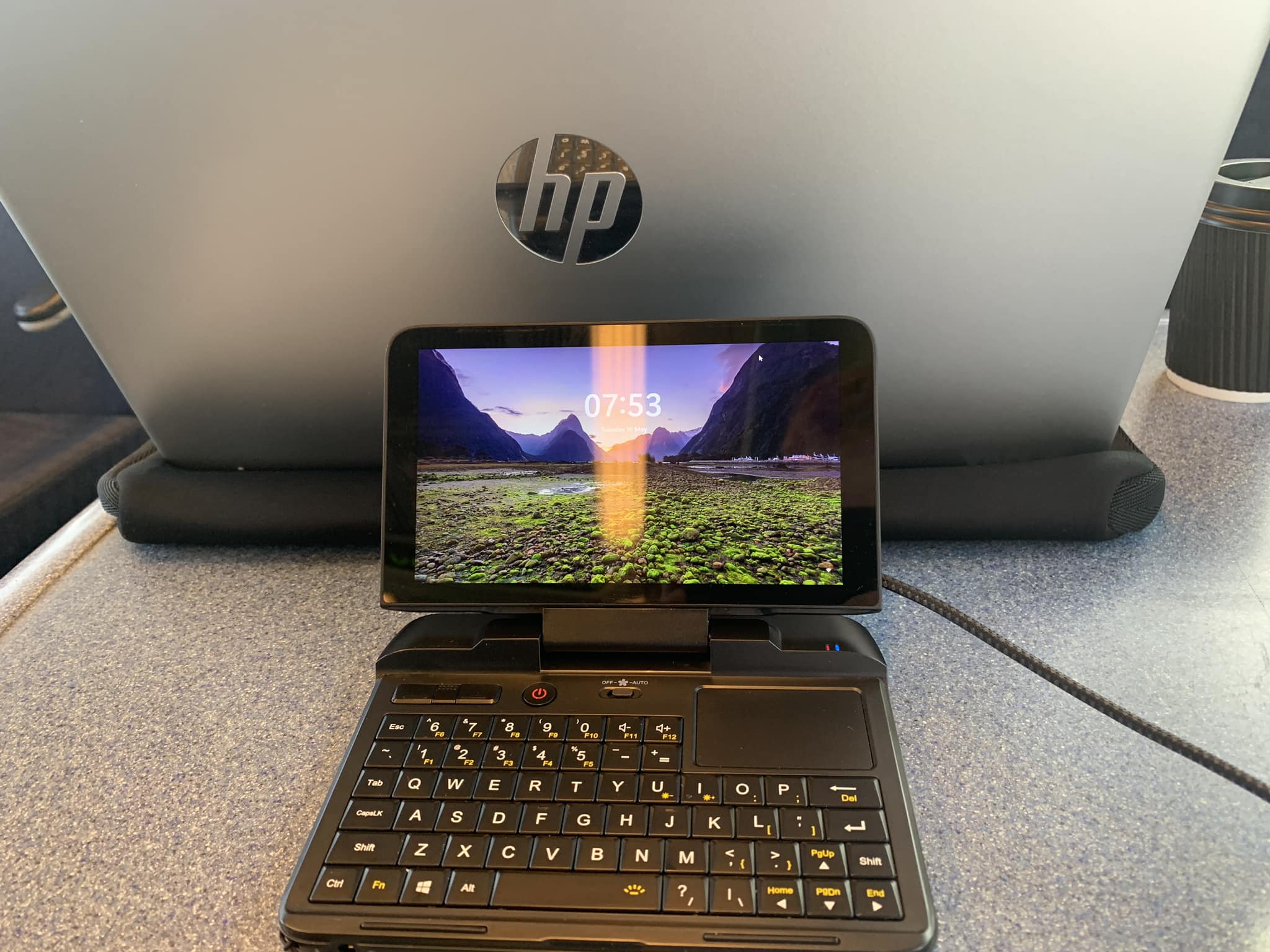
  • Mini PC’s are fun!

    Mini PC’s are fun!

    Even better in an environment that bans computers. Understablable for safety but sometimes?

    I came across this YouTube clip:

    Not mine I have to say, but, I looked at it and I thought “Hold my Pepsi one minute, there’s smaller still!”
    I don’t own a GPD Pocket PC sadly, I’ve always wanted one but never had the cash to buy one new or used. The Pocket 3 or 4 is on my wish list, but still.

    I owned a OQO Model 01 (which is 5.5″, that was tiny and slow!), I still own a OQO model 2 but not the much more rarer 02+ and the GPD Micro PC which is a 6″ screen. This is what it looks like with my Apple iPad 8″ 2021.

    Dinky isn’t it? Even my trackball is bigger than the laptop!


    Better, it has an upgradable SSD! I’ve done it, it takes a SATA 2242 SSD and it has a few interesting tricks. Did I tell you I brought 2 of them? One as a spare. You may wonder “but is it usable?” Actually, yes it is, 3 hour battery life, its silent, you can downclock the CPU to 6W or upto 10″, charges off a phone charger or even a computer USB port, the keyboard is teeny tiny, but it works and I’ve used this one a lot! You can also toss it anywhere you like. The big question is, why buy it? Pull up a chair, its going to be interesting.

    I brought this in November 2020 or so. My previous job, I had a big problem as I had to work during COVID and I was running out of tasks, so I stayed out the place and kept having issues with others, I can’t talk about it too much on here, but one was a bigger issue. So a manager asked “why don’t you take your laptop with you?”, “Ok then!” So opened the floodgates in between duties. No more spoken about it until the world started opening up after COVID and I was doing a lot on the computer, using my home one remotely, building models, interacting, setting them up. Hundreds of things, until one day, they tried to withdraw it. Yep, stop me taking the computer with me.

    Thats when the fun started. They wouldn’t let me, so I started having more fun, tried phones to begin with with a keyboard and mouse, wasn’t any fun over a remote connection, so I went one better, get a local computer, scoured the internet and then came across the GPD Miini PC for about Ā£230 on eBay. PERFECT! Brought it, took it with me to work the day after I got it and was like:

    “They can’t stop me taking my laptop now! :)” with my GPD poking out of my jacket pocket. The best bit is, they didn’t even notice it!

    My colleague I was talking to was laughing his head off. Management didn’t find the funny side of it, but I persevered and kept going and occasionally, I still use it. (Oh, then they cut the Wi-Fi to the station by ending “the cloud” contract and I had to rethink things, so an 8″ tablet made a return with a SIM card).

    Interesting problem, so I go to work on my first day, don’t have my work laptop and I walk in with my Chromebook. Ask my new boss to send me the copy of the workbook and he didn’t mind me using my personal laptop. Think about that for a minute. Plus I’ve admitted using my personal laptop in the past at work and no one minded as long as it was work related, which at the time, was, to keep up to date as I didn’t have a work phone or IT login.

    Whats it like to use? Well, light, fits anywhere, if you lose it, you won’t notice, if you carry it, you won’t notice, it turns heads and it is pretty capable. Oh, and has more I/O than your equivalent MacBook. It is really capable and I mean capable. You can game on it, GTAV works on it at 800×600 resolution and the fan on and that gives you an idea.


    I/O wise, it has 3xUSB 3.0 ports, a serial port (who needs one of those these days? Oh I do), HDMI out, USB-C for charging and supports everything bar thunderbolt I think, my Dell WD-19 dock worked as shown below, TF card, a headphone jack, an Ethernet port, some screw holes to mount it on and I think thats it.
    It also has Wi-Fi and Bluetooth.
    Somehow, GPD also installed a blacklit keyboard. I mention the good bits, the bad bits, the keyboard? Think of a calculator keyboard, its not rubber, but its as small, with squished keys, so typos? Yep, you’ll make a lot. The trackpad is in an awkward position, but when you hold it up, you can use your thumbs quite easily, so its a trade off in one area and a usable item in another. The sceen is very good for a device this size and its VERY light. Also has a wrist strap to stop you from dropping it. At least you get plenty of feedback.

    It can be slow too, I mentioned I’ve run GTAV at 800×600, but sometimes, it gets slow as hell, I guess it is just my device, bit the fact it works at all is a miracle. Oh and unlike other devices, it runs a full copy of Windows 10 or 11, or even Linux. Thats worth the trade off. The number keys are also badly positioned, but then I understand why.
    Then the final problem, some have hinge issues and that has worried me when I saw the reports of that. My 2 haven’t cracked yet, but there are reports online where they have. I’ve dropped it though and it is rugged.

    Who is it for? Well, if you like quirky things that you can hide, perfect. If you got an unnecessarily strict work place? Perfect. Otherwise, if you don’t have a need for it, don’t bother. It’s fun to carry, don’t get me wrong, the novelty does wear off after some time.

    Especially when you can shove it places its not suppose to go, like your shirt pocket.

  • Nice and short this time.

    Just a quick one if you are interested..

    (more…)

  • Past work..

    I probably should talk more about my past and present work, yet these days, I generally don’t tend to.

    PiggiesSWT

    Here is an item that took me around about a month and a half to draw using Microsoft Visio, way back in I think 2008, I vaguely remember being either at college or uni at the time and it was meant to be a avatar for the Trainz forum, it was! So was it’s off springs (livery).

    If you want to use it, you have all right to do so, I’m not looking for money for it, unless you want to give me a donation which will be appreciated and I would say ā€œyou don’t have to give me creditā€, it should be, its nice if you could give me credit, but you don’t have to.

    Just Right Click or Apple Click and save as.. depending on your OS (I use a variety, so its upto you).

  • Guess what I forgot?

    “Its just a manic Monday” the bangles said.

    So, Sunday, I get everything ready for work, change a laptop over, so I am using my Dell Latitude 7300 (which is identical to my work laptop – they are both the same, just one is upgraded and one is untouched), I also have my Toughbook on me.

    Next morning, make my lunch, stuff my bag (I need a bigger one), drive to Havant (haven’t a clue why), got onto the station, got my morning tea as I’m feeling tea’ed off, talk to someone I travel up with on a daily basis (nearly) then rummage through my bag

    Spot the missing cable and power supply!

    I only forgot the Toughbook charger and the cloverleaf power cable. It wasn’t a complete fail though as I have the Dell power supply. Oh and I didn’t charge the computers the day before. 61% and draining fast!

    So, how do I survive? Easy! Use power saving mode, knock off Bluetooth and 4G, knock down the brightness until you can just about see without overdoing it. Extreme measures would be to go to Control Panel > Power Options > Change plan Settings > Change Advanced Plan Settings > Change Settings that are currently unavailable > Processor Power Management … On Battery Then set it to something like 50%. The computer may well be slow at this point, but it will clock down the CPU to give you some precious minutes back.

    From here, you can go a step further. Either A) A) download your file you want to work on and disconnect from the Wifii/Netowrk or B) if you have a computer that is set up as a remote desktop and has remote access setup, you could do what I did, although using the on train wifi is super slow! I’ve unloaded all processing tasks from the laptop and then use the remote desktop instead.

    EDIT: Managed to charge the Dell! A USB-C to USB-A with the computer off did actually charged it, plus a colleague needed the same cable and asked for a USB-C to USB-C cable in exchange. It worked.

  • The fun of eBay (as a buyer) – not!

    As both sides, I’m a seller and a buyer and I can understand how frustrating it sometimes can be. I try to retain my 100% so far positive feedback and I don’t really want to leave negative feedback. However, I had one experience today that makes me wonder on both sides. I brought an item for Ā£25 – a tablet computer or Linx 8 in relation to the previous post, my bag can’t take a laptop or even the tablet I did buy when I start cycling! (If anyone has any suggestions that won’t throw the bike out of balance, please let me know.)

    So, I got a message this morning, this is what it said with my replies (the seller id has been omitted for clarity and to protect the “innocent”):

    Colour code, seller and my responses

    “hello. My wife has fallen tablet out of hand when he wanted to pack up and now no longer open. I’m really sorry and will give back the money. thanks for understanding.”

    (refund issued straight away)

    “Please elaborate? Your sentence doesnt make sense” (I should of corrected myself and added doesn’t.)

    “It has fallen to the ground when put it in his box”

    “Any visible damage?”

    (then a couple of seconds later:)

    “Are you able to send a photo to put my mind at rest please? It should show the damage”

    One thing I don’t tout a lot although my colleagues at my workplace know all to well, how good I am with computers, I worked in a computer shop, stripped several laptops and desktops, in recent times, I’ve even dealt with phones (I don’t want to do that again, they are just too fiddly). So I know what I’m doing most of the time. I try to go for 100% success rate, but more like 90%. I also know how to run complicated networks, even a thin client network which I have started a small scale one. Anyway, his reply:

    “No visible damages. I’m work now, this evening I send you photo.”

    Lets see what he produces later.


    First thing is first, why didn’t he message me and send something likeĀ “I do apologise, I have a slight issue with the tablet. While we were packing yourĀ tablet computer for shipping, we dropped it. The issue at the moment is I don’t get anything on, I can send you a photo of the damage if you want or when you get it and you aren’t happy with it, I can issue you a refund. What would you like me to do?”
    Simple, effective and helpful, its communication. This person assumed I don’t want it straight away and issued a refund which gets me suspecting something dodgy, but I cannot prove it yet. Communication can solve a LOT of issues.Ā You’ll notice that I asked for photos, I would of sent one as soon as they requested one, that would be the avoidance of doubt and OK, my reputation would take a hit but at least in this instance, I was tempted to leave negative feedback. We will see.

Accessibility Toolbar